Opi Jayasinghe
Health - Wealth - Happiness
  • Home
  • Health
  • Wealth
    • Business
      • Getting Started
      • Local Business
        • Letter to Dan – Getting Your Local Business Online
      • Mobile Apps
        • Why Everyone Needs To Get On Scribd
      • SaaS Applications
        • Automation
        • Booking App
          • Best Online Booking Plugin for Hair Salons and Hairdressers
        • CRM
          • Flowlu is a complete all-in-one solution to enhancing your Daily Operations
        • Engagement
          • Quick Review of ConvertBox – The best Engagement Tool I’ve found
        • Funnel Builders
        • Integrations
          • Integrately: Your One Stop Shop for Application Integrations
        • Payment Gateways
          • Thrivecart vs PayKickstart – In-Depth Review and Comparison
        • Video Software
          • Viddyoze Review + My Mega Bonus
        • Webinar Platforms
          • What is The Best Webinar Platform?
        • Keyword Research
    • Shares
    • Real Estate
      • 6 Steps To Achieving Success As A Real Estate Agent
  • Happiness
  • Video Streams
  • Books
    • Rich Dad Poor Dad Book Review – Best Book On Building wealth!
    • Expert Secrets is undoubtedly the best read of the Year!
  • Crypto Websites
  • Disclaimer
  • Contact
Author

opijayasinghe

opijayasinghe

Long Tail Review Banner
Keyword Research

Long Tail Pro Review – Is there a better alternative?

by opijayasinghe April 20, 2018

Long Tail Pro Review

When it comes to keyword research, it’s hard to find a more robust piece of software than Long Tail Pro. This product which was initially released as an Adobe Air application has been around for many years and the development team maintain the integrity of it’s key functions at the highest level.

Long Tail Pro is now a SaaS application. I personally found this decision to be the correct one as the software is now completely flawless. The creator of Spencer Haws and the team can now push through seamless software updates without the end user having to worry about the technical detail.


>> Grab Long Tail Pro + My Super Bonus Package <<


Key features of Long Tail Pro

The Average Keyword Competitiveness is a proprietary score design specifically for LTP and which tells you the difficulty of ranking in the top 10 Google Results.

Powered by Majestic SEO, you have view metrics to determine competitive domains strength, page strength, referring domains, indexed URLs, number of links and site age.

Calculate Keyword Profitability but using a brand new feature called Rank Value which determines a keyword’s profitability based on Adsense site, Amazon site or even if you’re selling your own product.

Export Results into a CSV format. If you like toe geek out with spreadsheets, you’ll love this feature

Real-time filtering is amazing! By you setting a few easy parameters, you can cut down thousands of keywords into a handful of super targetted keywords which you’ll be able to start working on immediately.

Lastly, you can manually input keywords which you’ve exported from another tool or AdWords itself to allowed Long Tail Pro to review this data and give you analysis on it’s KC, Rank Value and other important metrics.

Understanding how long tail pro works is simple
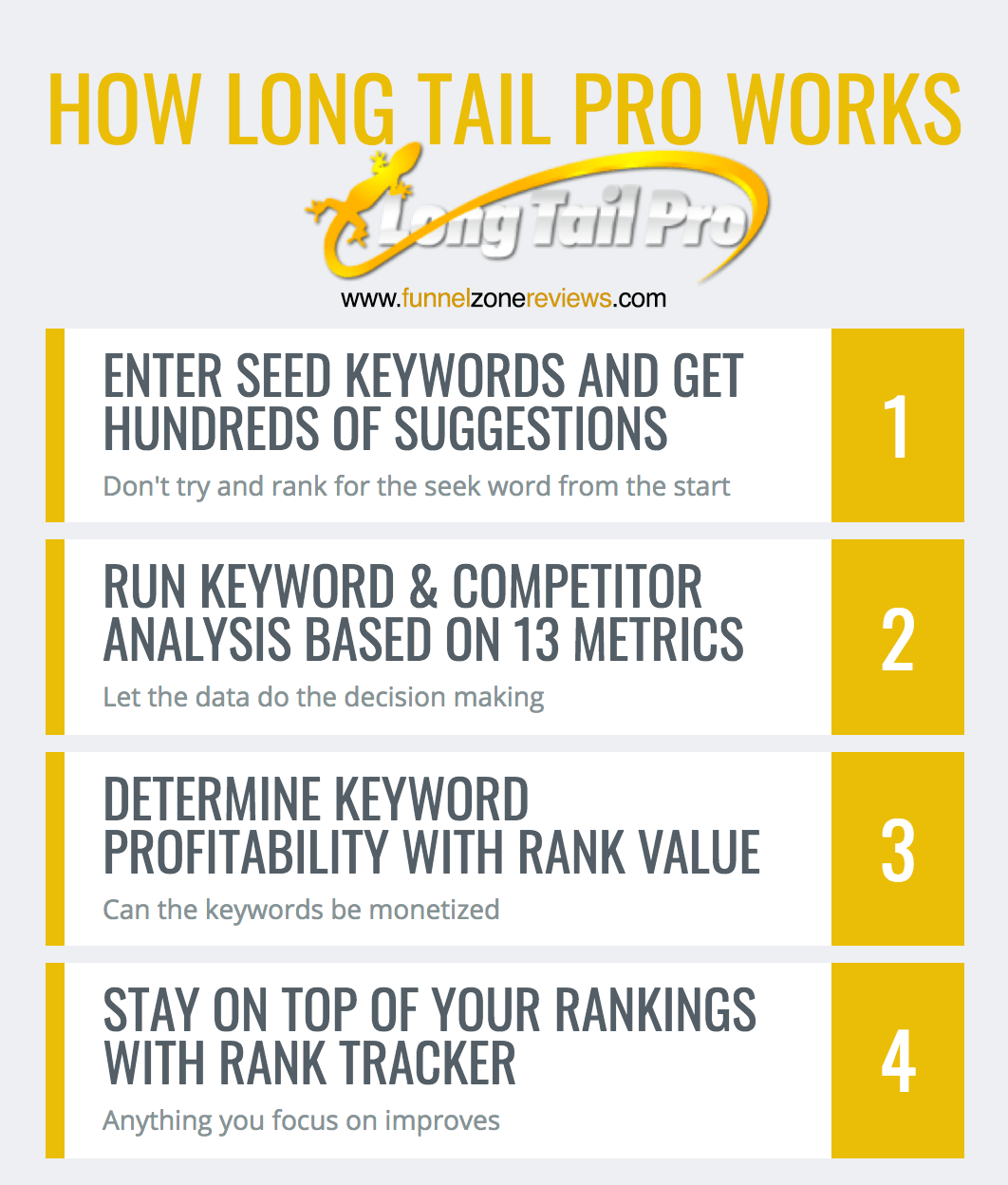
How Long Tail Pro Works

Long Tail Pro Alternatives

Free Option

The obvious alternative is to use the free keyword planner provided by Google. This is great and is an excellent option if you have a zero budget to spend on any tools.  Unfortunately, it does lack the many valuable features which comes with premium software products.

Market Samurai

The product created by Eugene Ware, Market Samurai has been one of the most popular Keyword Research tools for many years. It is a desktop application powered by Adobe Air is available for a one-time payment of $149.00. Obviously, you can try before you – click here.

Getting Long Tail Pro at a Discount

Though many of us would love a lifetime subscription to this service, the fact of the matter is that there are ongoing costs for the development team to maintain this software. Never the less, we still want a discount right? Well, here it is. Until Midnight EST on the 23rd April 2018, the Long Tail Pro crew is offering a lifetime deal of 15,000 20,000 keyword search for only US$27.00. Yes, this doesn’t expire and for $27/ this is a great starting place.

This is what the main offer.
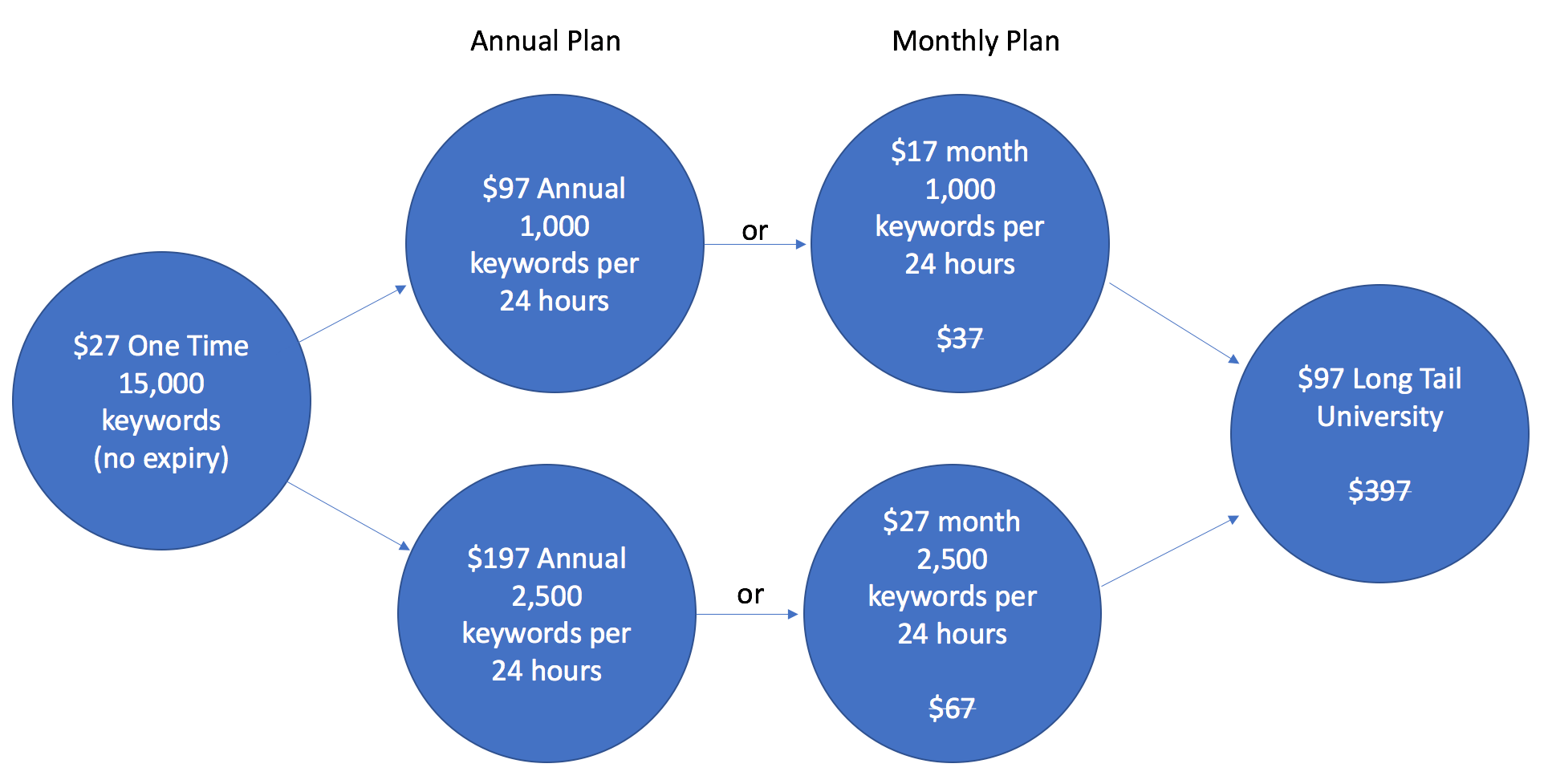
Long Tail Pro Funnel Visualized


The Annual Offer to LTP

For serious marketers who intend to use the software regularly and requiring a higher keyword allowance, you’ll be given the option to upgrade your order to an Annual plan.

  • 1,000 keywords per 24hrs paid annually will be $97.00 (this works out to be only $8.08 per month)
  • 2,500 keywords per 24hrs paid annually will be $197.00 (this works out to be only $16.41 a month)

The monthly offer to LTD

If you don’t want to commit to an entire year and you pass on the annual pricing, then you’ll be offered a monthly payment option.

  • 1,000 keywords per 24hrs paid monthly will be $17.00 (normally $37)
  • 2,500 keywords per 24hrs paid monthly will be $27.00 (normally $67)

The Long Tail University Special

The last offer you’ll get is a comprehensive set of training videos. Remember, this is optional and is in addition to the free Bootcamp you’ll receive with your initial $27/ purchase.

Spencer Haws and a few others in his team take you step by step through the following modules.

  1. Keyword Research
  2. Types of Keywords
  3. How to Find Seed Keywords
  4. How to Expand Seed Keywords
  5. Criteria of a Winning Keyword
  6. How to Analyze Your Competition
  7. Competitor Keywords & SEM Rush
  8. Developing a Content Strategy
  9. How to Write Great Content Based On Keywords
  10. WordPress Settings & On-Page SEO
  11. Keyword Tracking and ROI
  12. Not all keywords are created equal.

In addition, you’ll get the following 3 webinars for free.

Webinar #1: Simple Tweaks To Make Your Keywords Even Longer Tail.  This is over an hour long IN-DEPTH content about using keyword modifiers to truly take your keyword research to the next level.  I honestly think this webinar alone is worth the value of the course.

Webinar #2: How to Legally Steal Your Competitors’ Keywords.  In this webinar, I share more in-depth strategies for taking what’s working (and what tools to use) for your competitors and applying it to your own sites.

Webinar #3: How to Turn Great Keywords into Profitable Content.  This hour-long webinar shows the powerful strategies I use in my business to create amazing content from low competition keywords.

If you are a professional marketer who is making decent money online already, you may not need this training. For everyone else, it’s worthwhile you making this $97/ investment.

Long-Tail-Pro-Search-Results-KC-ColumnMy Recommendation

Honestly speaking, this is one piece of software which I use almost on a daily basis and is something I could not live without. I don’t need to be a technical person. All I need to do is use the keywords highlighted in Green (Avg. KC) and the rest will take care of itself – more or less.

The entry price point of $27/ is simply too good to pass up on. Therefore it’s a no-brainer to take this offer while this Long Tail discount is still available.

This review is honestly something that was so easy to write because I passionately do love this software and I am happy to promote it without a second thought.

Producing content today without a reliable keyword research tool is like driving at night without your lights on. Sooner or later, you’ll crash and burn.

Make the decision today and invest in a quality product.


>> Grab Long Tail Pro + My Super Bonus Package <<

My Bonuses 

  1. Creating Silo – Why every market should but they don’t

Creating

2. Super Affiliate Shortcuts

3. Link Supercharger

4. How to get the best value from Long Tail Pro


To Claim Your Bonus – send me a note with your PayPal transaction number https://www.opijayasinghe.com/contact/
>> Grab Long Tail Pro + My Super Bonus Package <<

April 20, 2018 0 comment
0 FacebookTwitterPinterestLinkedinTelegram
Video Software

Best Video Creation Software – EasyVSL vs Content Saumarai vs Explaindio vs Easy Sketch Pro

by opijayasinghe April 17, 2018

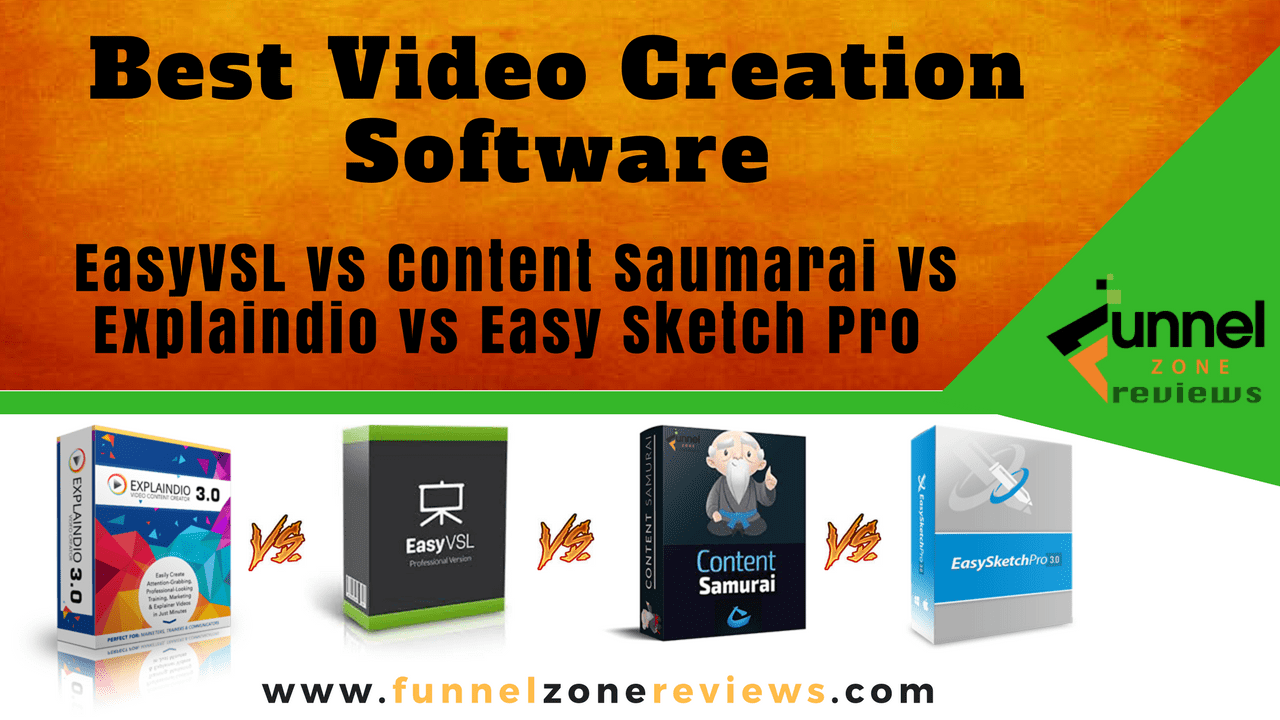
EasyVLS vs Content Saumari vs Explaindo vs Easy Sketch Pro

Communicating effectively with your Videos

Video is such a powerful method to communicate to your audience, it’s a must for all business owners, educators and vloggers. Producing quality impactful videos on a consistent basis can be a challenge for most people. Those who overcome this hurdle are the ones who really stand out from the crowd and build a loyal cult-like following.

What are your options?

There are several options for creating videos.

  1. Talking Head – without a script
  2. Talking Head – with a script
  3. Video Animation
  4. Text Animation

1. Talking Head – without a script – This is by far my favourite way to create videos on my vlog. All I have to do is put my phone on self-mode, plug in my lapel microphone and start talking about the topic at hand. Of course this is not going to be production quality as there’ll be umms and ahhs but the pro side is it’s done quickly. I’ll option use this approach for doing review videos as well. I personally use Final Cut Pro for editing but any editor that you’re comfortable with is fine to use. There is a steep learning curve with these type of professional software like Final Cut Pro or Adobe Premiere. iMovie is a great alternative if you’re on a Mac.

  • Minimum Equipment Required
    • Camera – Professional Video Camera, Smart Phone Camera or Webcam
    • Microphone – Lapel mic or external microphone. In-built mics aren’t the best but if you’re not a budget, it will have to do.
    • Thoughts and Idea of what you want to talk about. Maybe a cue card.

2. Talking Head – with a script – Same as above but with a script. This tends to be a more professional approach with lights, a dedicated camera, tripods and prompter. I have done these videos before and they come out really well. The downside is, you can not pump them out as quickly as going off the cuff.

  • Minimum Equipment Required
    • Camera – Professional Video Camera, Smart Phone Camera or Webcam
    • Microphone – Lapel mic or external microphone. In-built mics aren’t the best but if you’re not a budget, it will have to do.
    • Teleprompter – Though these can be expensive, you can pick one off eBay for about $250.
    • iPad or Andriod Tablet – Install a teleprompting software from the Appstore or GooglePlay.
    • A Script of what you’ll actually say in the video.

3. Video/Whiteboard Animation – Majority of people wanting to create a video will not do this entire process themselves.Instead, they’ll engage in the services of a video specialist freelancer and outsource this entire process. Doing so is not cheap, even if you hire a freelancer. You’re looking at upwards of $200 for a very short animation.

However, In recent years, there has been a number of software which has come into the market that allows you create some fantastic videos with a minimal level of technical skills. Explaindio is one such software which is by far one of the most popular in the market.

Whiteboard animations are an extremely popular way to communicate your message as it keeps the audience visually stimulated. One of my mentors really specialises in not only creating whiteboard animations but also wholesaling sales videos and graphics. Very effective and it is something you can learn to do with the right software like Explaindio or Easy Sketch Pro.

  • Minimum Equipment Required
    • Software – As recommended before but Explaindio is one of the most popular software’s available in the market today. It is not only affordable but very easy to use. What’s more, it works on both Mac OS and Windows as it’s an Adobe Air application.
    • Recording the Audio – this can be done via a portable audio recorder such a Zoom H1, H2n, H4n, H5, or Tascam DR-05, DR-40, 22-WL. Alternatively, you can use an audio recording software such Adobe Audition or Audacity which is completely free for Mac and PC.
    • A Script of what you’ll actually say in the video.

4. Text Animation is becoming extremely popular. Without a doubt, the popularity is due to a dominant marketing company; the crew from Noble Samurai recently launching a web-based platform that makes text animations are a reality. The product they realised is called Content Saumari and it is absolutely ninja. The artificial intelligence of Content Saumari blows me away each time I use it.

  • Minimum Equipment Required
    • Software – There are two main pieces of software I’ve used for text animation videos.
      If you like to work on your desktop, then Easy VSL might be a good fit for you. This was created by Mark Thompson who has many other reputable software behind him such as PressPlay and PayKickstart.
      The web-based software which I use is called Content Samurai, created by the team from Noble Samurai where Eugene Ware is the CEO. The reason for mentioning Noble Samurai and Eugene is that you might have heard of him before as he released a product called Market Samurai years ago and it was unbelievably popular and effective for keyword research.
    • Recording the Audio – this can be done via a portable audio recorder such a Zoom H1, H2n, H4n, H5, or Tascam DR-05, DR-40, 22-WL. Alternatively, you can use an audio recording software such Adobe Audition or Audacity which is completely free for Mac and PC. Something worth noting is that both EasyVSL and Content Samurai have the functionality to record audio directly within the application. I personally wouldn’t recommend this is it’s easier importing an audio file rather than trying to record ‘in-house’.
      Trust me on this, I’m a professional DJ and I know my stuff when it comes to audio.
    • A Script of what you’ll actually say in the video

Which Video Creator should I use?

Like me, you may need to use a combination of some or all of them. It all does depend on your personality and what type of video you’re making. The Best Video Creation Software might very well be something in the pro range like Final Cut Pro or Adobe Premiere. Realistically speaking, for the everyday user who needs something simple and easy to use, the best video creation software might be something simple like Content Samurai where it’s all cloud-based some super easy to use. If you’re more comfortable working on a desktop software, then Easy VLS or Explaindio might be the app for you.

Money Back Guarantee – Use it to your advantage

The majority of this software will provide you with an unconditional money back guarantee for you trail the software. Explaindio, Easy Sketch Pro and Easy VSL all come with has 30-day money back guarantee. Content Samurai only has the 7-day guarantee which is enough time for you to tet and get a feel for the software; especially if you watch my bonus video. This is designed to enable you to take the plunge and try, test, play without taking any risk on your behalf. This so awesome. take advantage of this and try before you buy. Give it a full crack at it. Smash out some videos and determine which one works for you. Which one works well with your natural productivity style.

All you have to do is contact the manufacturer of the software and advise that you would like a refund. If you can provide a reason, I’m sure they’ll appreciate as this feedback will help them improve their product even further but that’s optional.


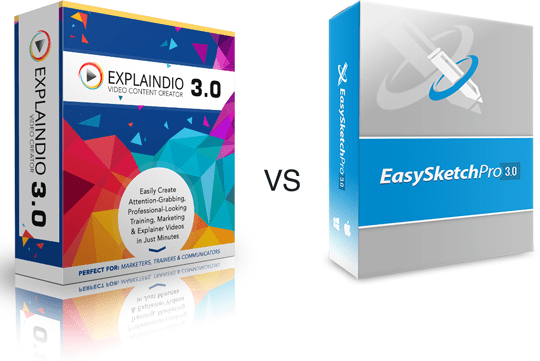
Explaindio vs Easy Sketch Pro – Comparable Software

  • Both of these are desktop applications powered by adobe air (works on both Mac and PC)
  • Easy Sketch Pro was released almost a decade ago. So it has stood the test of time; even with its crazy sales video on a boat. Well, crazy at the time anyway.
  • Explaindio is relatively a new player in this game compared to Easy Sketch Pro but it’s extremely powerful and the adoption rate by video creators have been nothing short of remarkable.
  • Mainly for Sketching, whiteboard animation type of Activity
  • Whiteboard style animations.

Explaindio 3.0 3D cover and Easy Sketch Pro 3.0 3D Cover


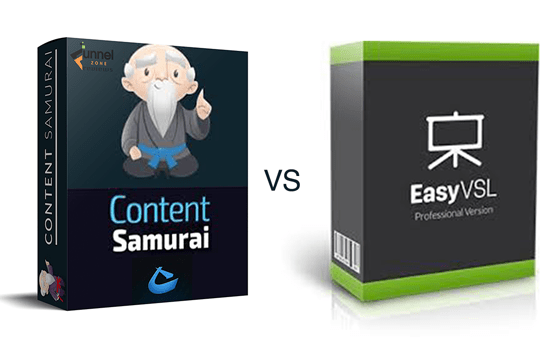
Content Samurai vs EasyVSL – Comparable Software

  • Content Samurai is a Cloud-Based Application – SasS Application. You don’t need to install anything. Logon to your account with any modern browser and you’re ready to go.
  • Easy VSL is a desktop application powered by adobe air (works on both Mac and PC)
  • Both applications have pre-defined themes you can use.
  • Easy VSL is now up to version 3 with ‘Speech to Text’ syn using IBM’s Watson AI.
  • Content Samurai also has ‘Speech to Text’ which I personally think works better than EasyVSL.
  • Animates text with your speech as an overlay.
  • Power to add background music as desired.

Content Samurai 3D Cover and EasyVSL 3D cover

My Recommendation

Truly, I personally use the first approach which is recording videos flying off the seat of my pants. These are great for vlogs and continually communicating with my audience.

For more structured content I use Content Samurai. It doesn’t mean this is better than the others. It’s just the one that I’ve leaned towards because of the auto syncing and auto-populating appropriate images from its own royalty-free database.

If you have absolutely no money to invest in a video creator, you can download and test some of the free video editors available here – https://en.wikipedia.org/wiki/List_of_video_editing_software

However, if you’re serious about making videos and will be doing this on a regular basis, investing in one of the software mentioned in this article will not only make your job easier but the extra features will have a higher production quality.

My Bonuses

–Coming Soon– 


April 17, 2018 1 comment
0 FacebookTwitterPinterestLinkedinTelegram
VPN

ExpressVPN vs PIA (Private Internet Access)

by opijayasinghe April 13, 2018

Overview

Choosing the correct VPN isn’t always easy. This article aims to compare two of the most popular VPN services available so you can make an informed decision that will be beneficial for your situation. Below is my honest comparison – ExpressVPN vs PIA.


What is a VPN

Virtual Private Network, which is more popular with its acronym VPN refers to a network technology, which helps in creating a secured network connection on any public network like the Internet. Though this technology offers a wide range of advantages to the users, it used to be used largely by the educational institutions, large corporations and government agencies for making a secured connection. However, it’s becoming more and more popular in the consumer or retail market as data privacy and anonymity becomes a prevalent issue. With this technology, even remote users of an organization can work in a private network. Depending on your choice, you can either go for the free ones or the paid ones. In this article, we’ll dive deeper as to why you should never use a free or a public VPN.

ExpressVPN vs PIA (Private Internet Access)

This comparison straight forward and easy to understand, the below chart can be used as a quick aid.

[go_pricing id=”expressvpn_vs_pia”

Should I just get a Free VPN?

Simple asnwer is, NO! Anyone, who is new to VPN services can be tempted to start by taking the free VPN options available in the market. The only advantage in doing this is that you’ll become familiar with what a VPN actually does but other than that, it’s not worth the risk.

  1. Free VPN equal malware– malware is software which is specifically designed to disrupt, damage, or gain authorized access to a computer system and it can come into your network via a Free VPN.
  2. Free VPN tracking – unsolicited tracking of everything you do on the internet. A CSIRO study concluded that 75% of all free VPNs has tracking enabled. This basically does the complete opposite to what you were trying to achieve.
  3. Third party access to your data means collecting your data which is used and sold by many third party companies which will profile you and in term target you for consumer offers.
  4. Stolen bandwidth means slower speeds for you. This can also be very profitable for free VPN companies to do which is to sell your bandwidth to third party companies. There have been instances where they use your
  5. Browser takeover or hijacking as the name suggests is taking control over some aspects of your browser functionality such as redirecting you to partnering third-party websites. Don’t even think about doing Internet Banking of payment related activities when you’re on a free VPN.
  6. Free VPNs leak your IP and other details, unlike the paid services. The key mandate of providing anonymity is clearly not upheld with a Free VPN.

With all the points mentioned above, the risk of Fraud and identity theft also increases. Therefore, please do yourself a favour and pay a small fee which is the cost of your anonymity and in turn retain your sanity knowing that no one is looking over your shoulder.

Did someone say Netflix? Yeah Baby!

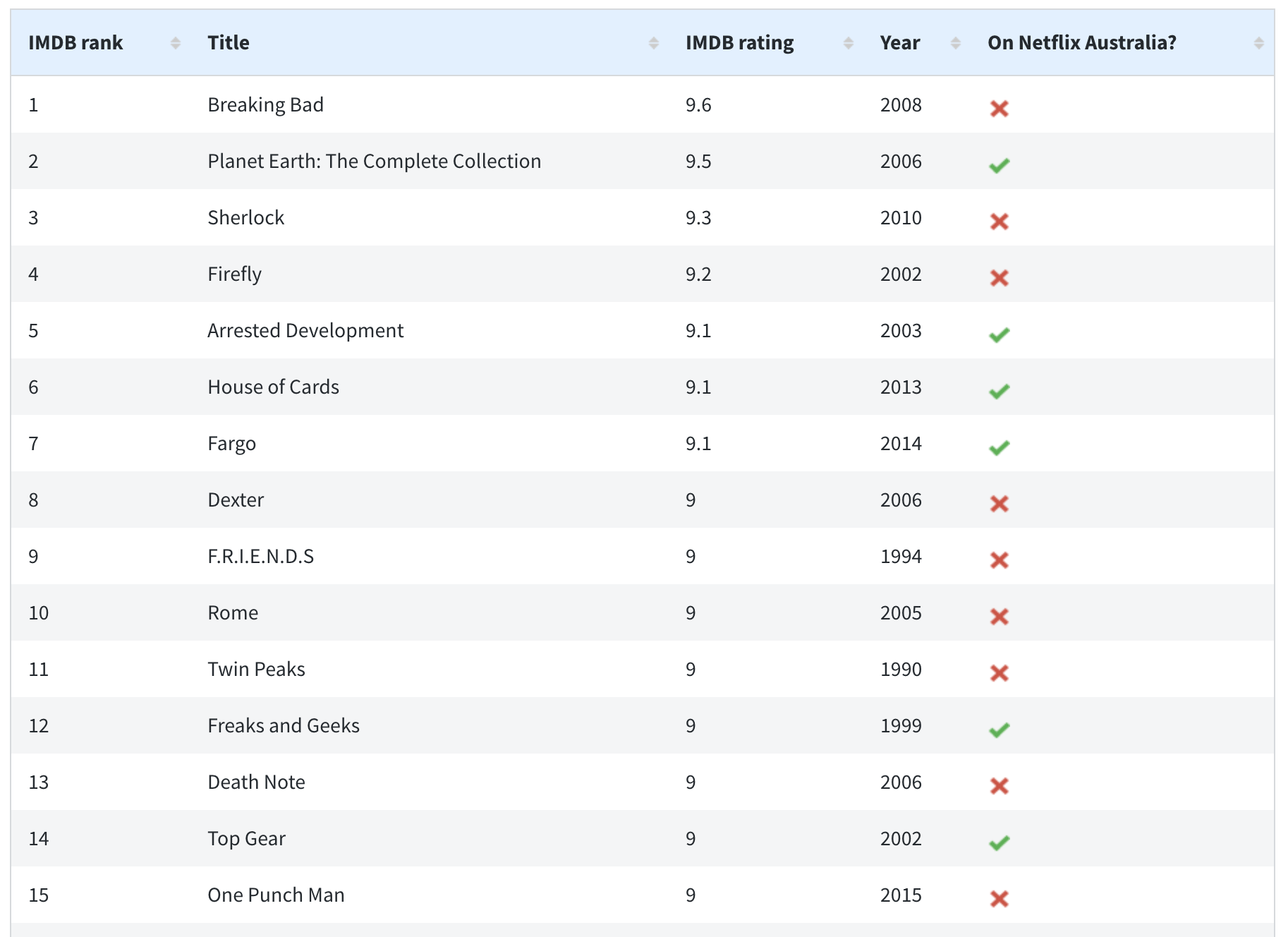
With an ExpressVPN service, you will also be able to access American Netflix from any place in the world. This is one of the key bonuses which comes with ExpressVPN. If you already live in the US, you might be thinking that this doesn’t add any value to you. However, you wouldn’t believe the number of people who desperately wanted to watch their favourite show while they’re travelling aboard, only to find out they are restricted to the Netflix version of the local country. With ExpressVPN installed on your laptop or phone, you’re never restricted no matter where you are… (yes, that sentence does sound like a cheesy commercial – I apologize).

US Netflix with ExpressVPN

Source – https://www.finder.com.au/netflix-australia-vs-netflix-us-tv-shows 

Use the Trial Period to your advantage

Remember, some VPN companies will give you a risk-free trial period. I recommend you literally try before you buy. Sign up, install it and test and speeds and functionality. If you’re not happy with the speeds and you like the company, contact their support and attempt to troubleshoot the issue. However, if the problem persists please request a refund and try a different VPN company.

This must be done within the first 30 days, but I recommend doing the testing within the first week.

  1. Goto Google and search for “speedcheck” and obtain a baseline of your current internet speed.Write down both the download and upload speed. You may need to do this over several days and different time duringthe day. Generally speaking, during the evening most people in your street and neighbourhood are online, browsing, downloading and streaming. This may impact your speeds as well so it’s important to test your speeds say at 8am and 8pm.
  2. Sign up for a company which you’ve determined to be best fit for you.
  3. Connect to the nearest server and check the speeds. Again, write down the speeds over several days both evening and at night.
  4. You should notice a slight drop in speeds when you’re connected via VPN. I personally wouldn’t tolerate a speed drop of more than 20%.

[ultimate-faqs include_category=’express-vpn’ ]


Conclusion and my recommendation

ExpressVPN vs PIA – both have its Pros and Cons.

Pro for PIA is its pricing. Super cheap pricing, especially if you go for the 2-year plan. If you’re on a budget and you see the importance of getting a VPN, there’s no question – PIA is the winner.

Con for PIA is that every mother and their dog uses this and it’s basically the no-frills version of VPNs.

Pros for ExpressVPN are its slick application, high speeds and a solid reputation. As I mentioned earlier, there is the added bonus of accessing Netflix from outside the US if you need it.

Con for ExpressVPN would be its pricing. Plain and simple.

Knowing what I know now and having used both services, I would (and still do) use ExpressVPN over PIA. I’d rather pay a bit more for the reliability and robust desktop and mobile application. If you’re strapped for cash, then going with PIA is the best option. It’s certainly far better than nothing at all or god forbid – free VPN! Don’t do it (say it like Arnold Schwarzenegger).

Remember that this is an ExpressVPN vs PIA comparison. There are might be other VPN provides which may meet your requirements altogether. The key take away from this article should be to test a company and all it’s functionality during the trial period.

Stay Safe Online. All the best.

– Opi

April 13, 2018 0 comment
0 FacebookTwitterPinterestLinkedinTelegram
  • 1
  • 2
  • 3
  • 4

About Me

About Me

Opi Jayasinghe

Lead Business Analyst 📕 - Pro DJ🎧 - Entrepreneur💡 - Investor🏠 - Marketer 🌎 Plant-based🌱 - Free Market Capitalist 💷


"Transform Your Health: Read 'How Not To Die' by Michael Greger Today!"

"How Not To Die" by Dr. Michael Greger offers a groundbreaking exploration into the realm of nutritional science. In this compelling read, Dr. Greger, a renowned physician and nutrition expert, delves into the top causes of premature death and how they can be prevented through diet and lifestyle changes. With a focus on plant-based eating and backed by extensive research, this book provides practical advice and insights on how to live a healthier, longer life. Whether you're looking to overhaul your diet or simply make more informed food choices, "How Not To Die" is an essential guide that empowers readers to take control of their health destiny."

About Me

About Me

Welcome to my Website. Feel Free to message me if you have any questions. I'm most active on Twitter!

Popular Posts

  • 1

    Ultimate Guide to the Healthiest Green Smoothie

    February 12, 2024
  • 2

    What is Xen Crypto? Don’t miss the Xen Crypto by Jack Levin

    October 7, 2022
  • 3

    Letter to Dan – Getting Your Local Business Online

    August 17, 2019
  • Facebook
  • Twitter
  • Instagram
  • Pinterest
  • Linkedin
  • Youtube
  • Disclaimer
  • Contact
  • YouTube

@2024 - All Right Reserved. Jayasinghe


Back To Top
Opi Jayasinghe
  • Home
  • Health
  • Wealth
    • Business
      • Getting Started
      • Local Business
        • Letter to Dan – Getting Your Local Business Online
      • Mobile Apps
        • Why Everyone Needs To Get On Scribd
      • SaaS Applications
        • Automation
        • Booking App
          • Best Online Booking Plugin for Hair Salons and Hairdressers
        • CRM
          • Flowlu is a complete all-in-one solution to enhancing your Daily Operations
        • Engagement
          • Quick Review of ConvertBox – The best Engagement Tool I’ve found
        • Funnel Builders
        • Integrations
          • Integrately: Your One Stop Shop for Application Integrations
        • Payment Gateways
          • Thrivecart vs PayKickstart – In-Depth Review and Comparison
        • Video Software
          • Viddyoze Review + My Mega Bonus
        • Webinar Platforms
          • What is The Best Webinar Platform?
        • Keyword Research
    • Shares
    • Real Estate
      • 6 Steps To Achieving Success As A Real Estate Agent
  • Happiness
  • Video Streams
  • Books
    • Rich Dad Poor Dad Book Review – Best Book On Building wealth!
    • Expert Secrets is undoubtedly the best read of the Year!
  • Crypto Websites
  • Disclaimer
  • Contact